
A Google Play gift card looks the same everywhere, but it isn’t. Every card belongs to one country, and if that country doesn’t match your Google account, the code simply won’t redeem.
This guide explains how Google Play gift card regions work, how to check your own Play country and which card to buy for each common situation. It also covers what happens when you travel or move, and what the typical region errors mean.
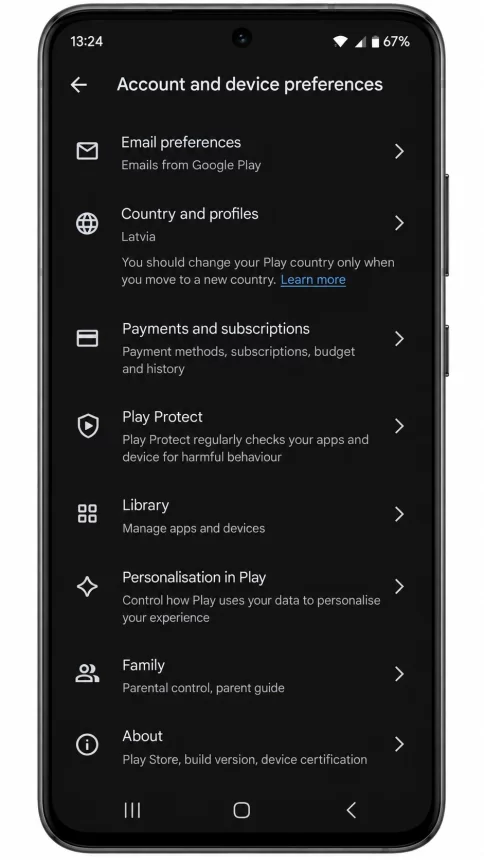
Buy the Google Play gift card for the same country as your Google Play account. A US card only works on a US account, a German card on a German account, and so on. You can check your country in the Play Store under Settings → General → Account and device preferences → Country and profiles.
Why Google Play Gift Cards Are Region Locked
Google sets prices, taxes and available apps separately for each country. For that reason, every gift card is tied to one country and one currency as well.
Google’s own rule is clear: Play gift cards “may only be redeemed and used in the country and currency in which they were purchased”. On top of that, the country listed in your Google Play account has to match the country of the card.
In practice, that means two things. First, a card from another country won’t redeem on your account. Second, even a card in the right currency can fail if it was issued for a different country.
How to Check Your Google Play Country
Before you buy a card, check which country your account uses. It only takes a minute:
The country shown there is the one your gift card has to match. If you see a different country than you expected, sort that out first, because a card bought for the wrong country can’t be moved later.
Which Google Play Gift Card Should You Buy
Once you know your Play country, choosing the card is simple. Here are the Google Play gift card regions TopGift currently offers:
| Your Google Play country | Card to buy | Currency |
|---|---|---|
| United States | Google Play Gift Card (US) | USD |
| United Kingdom | Google Play Gift Card (UK) | GBP |
| Germany | Google Play Gift Card (DE) | EUR |
| France | Google Play Gift Card (FR) | EUR |
| Italy | Google Play Gift Card (IT) | EUR |
| Austria | Google Play Gift Card (AT) | EUR |
| Switzerland | Google Play Gift Card (CH) | CHF |
| Poland | Google Play Gift Card (PL) | PLN |
| Turkey | Google Play Gift Card (TR) | TRY |
| Canada | Google Play Gift Card (CA) | CAD |
| Australia | Google Play Gift Card (AU) | AUD |
| Brazil | Google Play Gift Card (BR) | BRL |
| United Arab Emirates | Google Play Gift Card (UAE) | AED |
There’s also a Google Play Gift Card (EU) for accounts in other eligible European countries. Since it doesn’t cover every country, check the list on the product page before you buy it.
Same Currency Doesn’t Mean Same Region
This is the mistake people make most often. Germany, France, Italy and Austria all use the euro, so it seems logical that one euro card would work in all of them. However, Google ties each card to a country, not just a currency.
So if your account is set to France, buy the French card. A German card in euros may still be rejected, even though the amount and the currency look exactly right.
The same logic applies outside Europe. A US card won’t work on a Canadian account, even though both stores sell apps in dollars.
What Happens When You Travel or Move
Traveling and moving are two different situations, and Google handles them differently.
When you travel, your account stays in your home country. Your Play balance, however, can usually only be spent while you’re in that country. If you try to buy something abroad, you may see a message that your balance can only be used in your home country. In that case, simply wait until you’re back.
When you move, you can change your Google Play country, but there are a few rules:
- You need to be in the new country and have a payment method from there.
- After a change, you have to wait at least 90 days before you can change again.
- You can’t change your country while you’re in a Google family group.
- Your old Play balance stays in the old country and doesn’t transfer.
- You lose your Play Points, and your level doesn’t carry over.
So before you move, it’s best to spend your remaining balance first. After the switch, buy gift cards for your new country only.
ImportantGoogle can take up to 48 hours to update your profile after a country change. Wait until the new country appears in your settings before you redeem a card for it.
Common Region Errors and What They Mean
If a code won’t redeem, the error message usually tells you why. These are the ones Google lists for region problems:
- “This code can only be used in [country]”: the card belongs to a different country than your account. You need a card for your own country.
- “Your Play balance can only be used in [country]”: you’re trying to spend your balance outside your account’s country, for example while traveling.
- “You have reached your redemption limit”: this one isn’t about the region. Spend some of your balance, wait 24 hours and try again.
If your problem is a declined card rather than a gift card, our guide on what to do when a Google Play payment is declined covers the usual causes. For codes that fail for other reasons, see why a gift card is not working.
What You Can Buy With Google Play Balance
Once the code is redeemed, the balance works across the Play Store. You can use it for apps, games, in-app purchases, subscriptions, films and books.
There’s one exception worth knowing: Google Play gift cards can’t be used as a family payment method. So if you manage a family group, each member’s purchases need to come from their own balance or another payment method.
TipGoogle Play Fest runs until October 19, with extra Play Points and in-game deals. Our Google Play Fest 2026 overview has the dates and offers.
Frequently Asked Questions
Yes. Google Play gift cards can only be redeemed and used in the country and currency they were bought for, and your Google Play country has to match the card.
No. A US Google Play gift card only works on an account set to the United States. For any other country, you need a card issued for that country.
Not always. Google ties each card to a country, not only to a currency, so a German card may be rejected on a French account. Buy the card for your own country.
Open the Play Store, tap your profile icon and go to Settings, then General, then Account and device preferences, then Country and profiles.
Your balance stays in your old country and doesn’t transfer. You can only use it again if you switch back. You also lose your Play Points when you change country.
After you change your country, you have to wait at least 90 days before you can change it again. You also need to be in the new country and have a local payment method.
Key Takeaways


