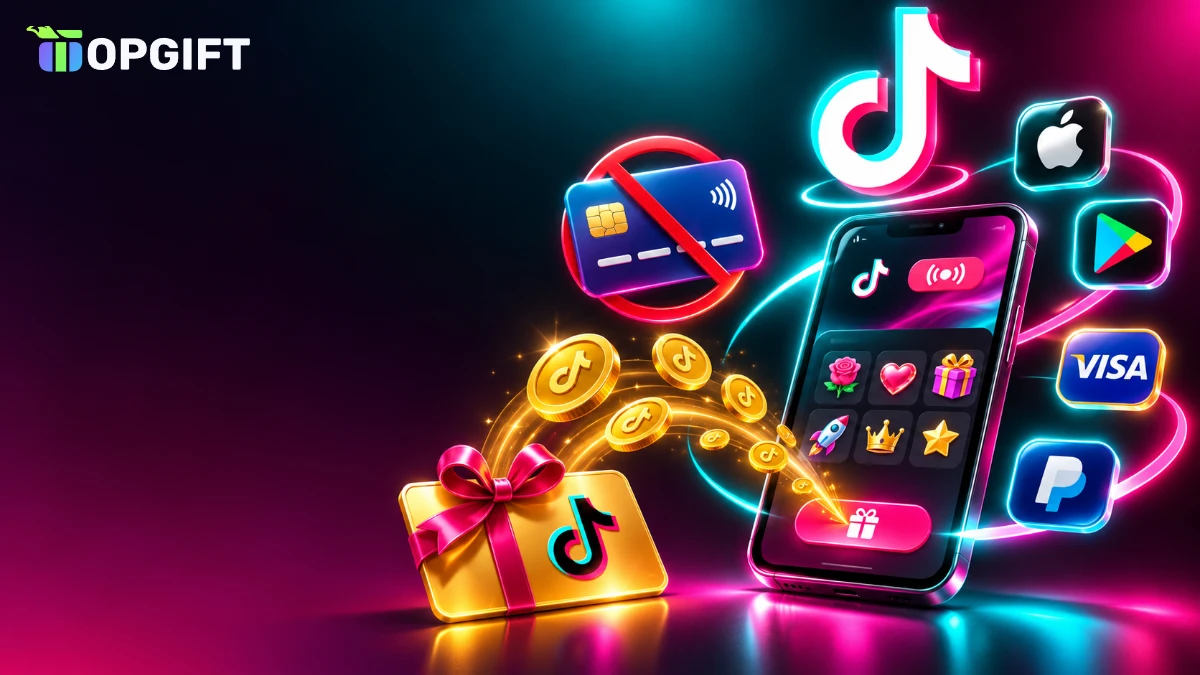
You do not need a credit card to buy TikTok Coins. In fact, there are at least five ways to top up your balance without one, from a TikTok Coins gift card to Apple and Google Play balances, prepaid cards, PayPal and debit cards. This guide explains each method step by step, compares their prices and shows which one is the cheapest and simplest for you.
Whether you do not have a credit card, prefer not to link one to TikTok or simply want a fixed budget, one of these options will fit. So, let us start with the short answer.
Can You Buy TikTok Coins Without a Credit Card
Yes, you can. After all, TikTok sells Coins in the app and on its website, and both accept several payment methods besides credit cards. Moreover, you can pay with a prepaid code, so no card at all touches your TikTok account.
Here are the main ways to buy TikTok Coins without a credit card:
- A TikTok Coins gift card, a prepaid code that tops up your balance.
- An Apple Gift Card, which adds money to your Apple Account for in-app purchases on iPhone.
- A Google Play gift card, which adds Google Play balance for purchases on Android.
- A prepaid Visa or Mastercard, which works like a card at checkout on the TikTok website.
- PayPal or a debit card, where TikTok offers them in your country.
Of course, each method has its own pros and cons, especially when it comes to price. Therefore, it helps to compare them before you top up.
TikTok Coins without a credit card at a glance
TikTok Coins Without a Credit Card Compared
However, not all methods cost the same. In general, buying Coins on the TikTok website is cheaper than buying them in the app, because Apple and Google take a commission on in-app purchases. The table below compares the five options.
Ways to buy TikTok Coins without a credit card
| Method | Where you use it | Price level | Best for |
|---|---|---|---|
| TikTok Coins gift cardTop pick | Rewarble, then TikTok | Website-level | Privacy and fixed budgets |
| Apple Gift Card | TikTok app on iPhone | App price | iPhone users without a card |
| Google Play gift card | TikTok app on Android | App price | Android users without a card |
| Prepaid Visa or Mastercard | tiktok.com/coin | Website price | Paying like a card, no bank |
| PayPal or debit card | App or website, where offered | Depends on where you pay | People who already use them |
As you can see, the gift card and the prepaid card both let you avoid app-store prices. Meanwhile, Apple and Google gift cards are the simplest on a phone, but you pay the higher in-app price.
Method 1 TikTok Coins Gift Card
To begin with, a TikTok Coins gift card is the most direct way to top up without a credit card. You buy a prepaid code, redeem it through Rewarble and add the value to your TikTok account. Because the code is prepaid, TikTok never sees your bank card, and you cannot spend more than the card holds.
On TopGift, TikTok Coins gift cards come in five currencies: USD, EUR, GBP, CAD and AUD. The USD and EUR cards offer fixed values of 30, 50, 60, 100 or 150, as well as a custom amount, while the GBP, CAD and AUD cards come as custom amounts.
- No card on TikTok: your bank details stay out of the app.
- A fixed budget: you send only what you loaded.
- Website-level pricing: you avoid the app-store premium.
- Great as a present: fans can support creators without their own card.
5 currencies
TikTok Coins Gift Card
Top up TikTok Coins without a credit card. Choose USD, EUR, GBP, CAD or AUD, and get your code within minutes.
Buy TikTok Coins Gift CardHow to Redeem a TikTok Coins Gift Card
Fortunately, redeeming a TikTok Coins gift card takes a few minutes. You need your TikTok login and the code from your order.
How to redeem a TikTok Coins gift card
Depending on the card, Rewarble either completes the top-up for you or gives you a prepaid payment method to use at tiktok.com/coin. In both cases, follow the steps shown after you enter the code. For a version with screenshots, see our Rewarble redeem guide.
Once the top-up is complete, the Coins appear in the same balance you use in the app. Therefore, you can send gifts on TikTok LIVE exactly as before.
Method 2 Apple Gift Card on iPhone
Next, on iPhone, TikTok sells Coins through Apple. That means you can pay with your Apple Account balance instead of a card. An Apple Gift Card is the easiest way to add that balance.
First, redeem the Apple Gift Card in the App Store or in Settings, so the money goes to your Apple Account. Then open TikTok, go to your balance and choose a Coins package. When you confirm, Apple takes the payment from your balance first. As a result, no credit card is needed at all.
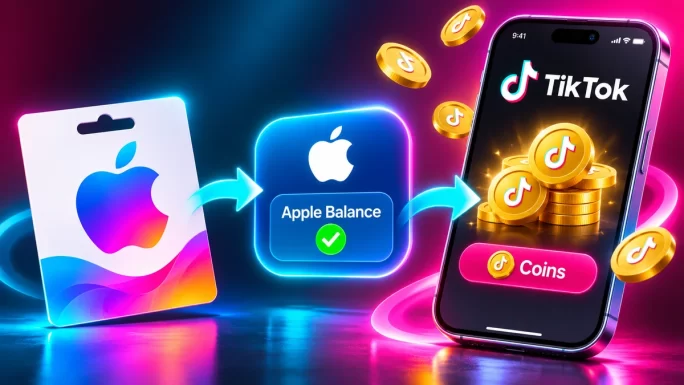
Keep in mind, however, that this route uses the in-app price, which includes Apple’s commission. So, it is convenient but usually more expensive per coin than the website. For more on Apple balances, see our guide on using an Apple Gift Card without a bank card.
26 regions
Apple Gift Card
Add money to your Apple Account and pay for TikTok Coins in the iPhone app without a credit card.
Buy Apple Gift CardMethod 3 Google Play Gift Card on Android
Similarly, on Android, the TikTok app takes payments through Google Play. So, a Google Play gift card works in much the same way as an Apple Gift Card on iPhone.
To use it, redeem the code in the Google Play Store app, which adds the value to your Google Play balance. After that, open TikTok, pick a Coins package and choose Google Play balance as the payment method. The Coins then appear in your account straight away.
Again, this route uses the in-app price, so it costs more per coin than buying on the website. Also, make sure the gift card matches the country of your Google account. Our guide to Google Play gift card regions explains which one to choose.
26 regions
Google Play Gift Card
Add Google Play balance and buy TikTok Coins in the Android app without a credit card.
Buy Google Play Gift CardMethod 4 Prepaid Visa or Mastercard
Alternatively, a prepaid Visa or Mastercard works like a normal card at checkout, but it is not linked to a bank account or a credit line. You load it once, and you can spend only what it holds.
To use one for TikTok, go to tiktok.com/coin in a browser, log in to your TikTok account and choose a Coins amount. Then enter the prepaid card details at checkout. Because you pay on the website, you also get the lower website price.
Our Visa and Mastercard payment cards are delivered as virtual cards. For a full walkthrough, see our guide to the virtual prepaid Visa and Mastercard.
Method 5 PayPal and Debit Cards
In addition, depending on your country, TikTok may offer PayPal or debit cards at checkout. A debit card takes money straight from your bank account, so it is not a credit card, even though it looks similar.
PayPal is useful if you already have a balance there or want to keep card details away from TikTok. However, availability changes by country and by platform, so you may see it on the website but not in the app. Therefore, check the payment options on the checkout screen before you choose a package.
Why the Website Is Cheaper Than the App
Interestingly, the same Coins can cost noticeably different amounts depending on where you buy them. In the US, Coins bought inside the iOS or Android app cost roughly 1.5 cents each, because Apple and Google take a commission. On the TikTok website, by contrast, the same Coins cost closer to 1 cent each.

In other words, buying on the website can save you around a third on every top-up. That is why the TikTok Coins gift card and prepaid cards are often the best value: they let you pay at website-level prices without a credit card. For the full breakdown, see our guide to recharging TikTok Coins cheaper.
Same Coins, same balanceCoins bought on the website go into the same balance as Coins bought in the app. You send gifts in the app exactly as before, but you paid less for them.
Which Currency to Choose
If you choose a TikTok Coins gift card, pick the currency that matches how you plan to pay and where your account is used. On TopGift, you can choose USD, EUR, GBP, CAD or AUD.
TikTok Coins gift card currencies
| Currency | Values on TopGift |
|---|---|
| USDMost popular | 30, 50, 60, 100, 150 or a custom amount |
| EUR | 30, 50, 60, 100, 150 or a custom amount |
| GBP | Custom amount |
| CAD | Custom amount |
| AUD | Custom amount |
As a rule, choose the currency you normally see on TikTok’s recharge page. This avoids extra conversion costs and keeps the value easy to understand.
How to Check Your TikTok Coin Balance
Before you top up, however, it is worth checking how many Coins you already have. In the TikTok app, open your profile, tap the menu in the top corner and go to Settings and privacy, then Balance. The exact labels can vary slightly between app versions.
That screen also shows a recharge button. Keep in mind, however, that it uses the app price. So, check your balance there, and then top up on the website or with a gift card if you want to pay less.
Age Rules and Account Requirements
Importantly, TikTok only lets adults buy and send Coins. According to TikTok’s rules, you must be at least 18 to purchase Coins and send gifts. Some features may also require a verified account, depending on where you live.
In addition, Coins are tied to the account you bought them for. You cannot transfer them to another person, and TikTok generally does not refund them once they are in your balance. So, always check that you are logged into the right account before you pay.
Gifting TikTok Coins Without a Credit Card
TikTok does not let you send Coins directly from your balance to a friend. However, you can still give Coins as a present in a simple way: buy a TikTok Coins gift card and send the code instead.
The recipient then redeems the code on their own account, using their own TikTok login. As a result, they get the Coins without sharing any payment details, and you never need their password. This makes a TikTok Coins gift card a popular present for fans who love supporting creators on TikTok LIVE.
Before you send it, though, check the currency the recipient uses and remind them that they must be 18 or over to redeem Coins.
Best Way to Get TikTok Coins Without a Credit Card
So, which method should you choose? It depends on what matters most to you:
- Lowest price: a TikTok Coins gift card or a prepaid Visa or Mastercard on the website.
- Maximum privacy: a TikTok Coins gift card, since no card touches TikTok.
- Easiest on iPhone: an Apple Gift Card, if you do not mind the app price.
- Easiest on Android: a Google Play gift card, with the same trade-off.
- Already have PayPal: use it where TikTok offers it.
For most people, the TikTok Coins gift card is the best balance of price, privacy and simplicity. It works with website-level pricing, keeps your bank details private and makes a great gift for fans of TikTok LIVE.
USD
TikTok Coins Gift Card USD
Choose 30 to 150 USD or a custom amount up to 250 USD and top up TikTok Coins without a credit card.
Buy TikTok Coins Gift Card USDProblems Buying TikTok Coins Without a Credit Card
Most top-ups work on the first try. Still, a few problems come up often. Here is how to fix them.
Common problems and fixes
| Problem | Likely cause | What to do |
|---|---|---|
| Coins not showingMost common | Wrong account or delay | Check you are logged into the right account and refresh the app |
| Prepaid card declined | Balance too low or a temporary hold | Make sure the card covers the full price, plus a little extra |
| Gift card code rejected | Typo or wrong page | Enter the code on rewarble.com/redeem exactly as shown |
| Apple or Google balance not used | Another method selected | Choose your balance as the payment method at checkout |
| Cannot buy Coins | Age or account limits | Check that your account meets TikTok’s age rules |
If your Coins still do not appear, see our full guide on TikTok Coins not showing. Likewise, if you bought a code on TopGift and it does not work, contact our support team with your order number, and we will check it for you.
Staying Safe When Buying TikTok Coins Without a Credit Card
Because Coins cost real money, scammers often target TikTok users. Fortunately, a few rules keep you safe:
- Never log in to third-party sites that promise to deliver Coins with your TikTok password.
- Ignore “free Coins” generators. They are scams and can steal your account.
- Avoid huge discounts from unknown sellers on social media.
- Do not change your region with a VPN to get lower prices, since it breaks TikTok’s terms.
- Buy codes from established sellers that deliver working codes and offer support.
If an offer sounds too good to be true, it almost always is. So, stick to the official TikTok checkout, the official Rewarble page and trusted sellers.
Tips to Spend TikTok Coins Wisely
TikTok gifts are designed to feel quick and easy, which is exactly why spending can add up. A few simple habits help:
- Set a monthly budget and load only that amount with a gift card.
- Check gift prices in the gift panel before you tap Send.
- Buy on the website rather than in the app to get more Coins for the same money.
- Avoid saved cards in the app, so you never top up by accident.
- Remember that sent gifts are final and cannot be taken back.
Above all, treat Coins like real money, because that is what they are. For the price of every popular gift, see our TikTok gifts price list.
Frequently Asked Questions
Yes. Use a TikTok Coins gift card, an Apple or Google Play gift card, a prepaid Visa or Mastercard, or PayPal and debit cards where available.
Buying on the TikTok website is cheaper than in the app. A TikTok Coins gift card or a prepaid card used at tiktok.com/coin lets you pay website-level prices without a credit card.
Yes. Redeem the Apple Gift Card to your Apple Account, then buy Coins in the TikTok app on iPhone. The payment comes from your Apple balance.
Yes. Redeem it in the Google Play Store, then choose Google Play balance when you buy Coins in the TikTok app on Android.
Go to rewarble.com/redeem, select TikTok Coins, enter your code and TikTok account details, then confirm. The Coins appear in your balance.
Yes. TikTok only allows users aged 18 or over to buy Coins and send gifts.
Key Takeaways