If you own an iPhone, buying gift cards with Apple Pay is probably the quickest checkout you will ever use. You pick Apple Pay, glance at your phone, and the payment is done. Yet many people confuse Apple Pay with an Apple Gift Card or with Apple Cash, and those differences decide what you can actually pay for. This guide clears that up, then walks you through paying on iPhone, Mac and other browsers.
How Apple Pay Works at an Online Checkout
Apple Pay lives in the Wallet app. You add a debit or credit card once, and your bank approves it for Apple Pay. From then on, the card can pay in shops, in apps and on websites without you typing a single digit.
Behind the scenes, Apple does not hand your card number to the shop. Instead, your iPhone holds a separate device account number, and each payment comes with a one-time security code. As a result, even the merchant never learns the number printed on your card.
Apple also says it does not keep a record of what you buy with your bank cards. Your bank sees the payment, the shop sees the order, and the details in between stay encrypted on your device.
In short, Apple Pay is not a balance and not a new account. It is a secure way of using the card you already have.
Apple Pay vs Apple Gift Card
This is where most of the confusion starts. Both names begin with Apple, yet they do opposite jobs.
Apple Pay vs Apple Gift Card
| Apple Pay | Apple Gift Card | |
|---|---|---|
| What it is | A way to pay with your saved card | A code that adds credit to your Apple Account |
| Money comes from | Your linked debit or credit card | The value of the code |
| Where you spend it | Shops, apps and websites that accept Apple Pay | Apple only: App Store, iCloud, Apple Music, Apple Store |
| Can it buy gift cards on TopGift? | Yes | No |
Put simply, Apple Pay is the wallet, while an Apple Gift Card is something you put into your Apple Account. You can, of course, use Apple Pay to buy an Apple Gift Card, and that is one of the most common orders on our site.
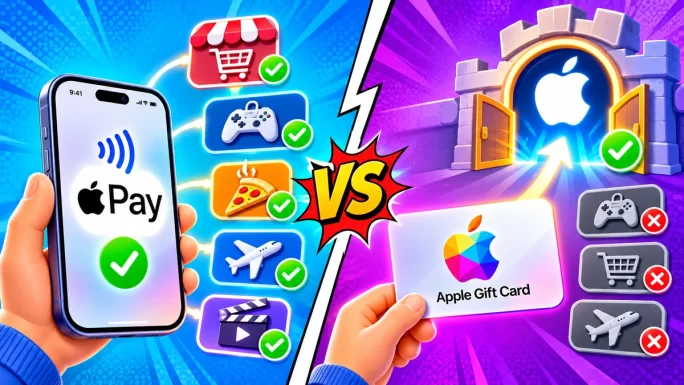
In many countries, one Apple Gift Card now covers apps, games, subscriptions and even products from the Apple Store. Older iTunes and App Store cards worked only for digital content, but they still add to the same balance today.
Can You Spend Apple Account Balance in Other Shops
No. Credit on your Apple Account stays inside Apple. You can spend it on apps, in-app purchases, iCloud storage, Apple Music, Apple TV and, in many countries, on hardware from Apple. However, it cannot pay another website, even one that shows an Apple Pay button.
Here is why. When you choose Apple Pay on an outside site, the payment always goes to a bank card in your Wallet. Your Apple Account balance is not a card, so it simply does not appear as an option.
Similarly, you cannot move that balance to a friend or turn it back into cash. That is worth remembering before you redeem a large Apple Gift Card on your own account.
TipBefore redeeming a big Apple Gift Card, check that it matches your Apple Account country. A card from another region will be rejected.
Our gift card troubleshooting guide explains what to do if a code is refused.
Is Apple Cash Accepted
Apple Cash is a different product again. It is a digital card in the Wallet app that holds money you receive from friends or add from a bank card. At the time of writing, it is available only in the United States.
Because Apple Cash behaves like a card inside Apple Pay, US users can often pick it at checkout just like any other card. Whether it works for a specific order depends on the shop and on how the payment processor treats prepaid balances.
For everyone outside the US, the answer is simple: your Wallet only holds bank cards, transit passes and tickets, so a regular debit or credit card is what pays.
Likewise, loyalty cards, boarding passes and event tickets stored in Wallet never show up as payment options. Only cards that your bank has approved for Apple Pay can pay for an order.
If you are not sure which card is set as default, open Wallet and look at the card on top. That card pays unless you switch to another one during checkout.
How to Buy Gift Cards With Apple Pay on iPhone
On TopGift, Apple Pay is a separate option at checkout, handled by our payment partner ZEN. On an iPhone, the whole order takes about a minute:
Pay with Apple Pay on iPhone
Above all, check the region before you confirm. A gift card for the United States, for example, will not work on a German account, and Apple Pay cannot catch that mistake for you.
Once the payment goes through, the order page loads within seconds. If the email does not show up, look in your spam or promotions folder before contacting support.
Paying on a Mac
Apple Pay works on a Mac too, as long as you use Safari. How you confirm depends on your hardware.
- Mac with Touch ID: the payment sheet appears on screen, and you confirm with your fingerprint on the keyboard.
- Mac without Touch ID: your iPhone or Apple Watch shows the payment, and you confirm there.
- Magic Keyboard with Touch ID: works the same way as a built-in sensor on supported Macs.
For the iPhone or Watch route, both devices need to use the same Apple Account and have Bluetooth turned on. If the prompt never arrives on your phone, unlock it and keep it near the Mac.
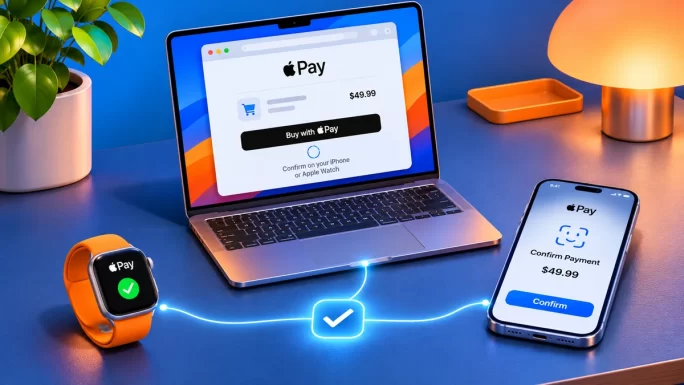
Many people prefer this setup for larger orders, since a bigger screen makes it easier to compare regions and values before paying.
In addition, Safari on the Mac remembers your email address and fills it in at checkout. Combined with Touch ID, that turns a full order into a few clicks, with no card to find and no number to type.
Using Apple Pay Outside Safari
Safari has always had the smoothest Apple Pay support. Even so, it is no longer the only option.
Apple Pay by browser
| Where you shop | Does Apple Pay show? | How you confirm |
|---|---|---|
| Safari on iPhone, iPad or MacBest support | Yes | Face ID, Touch ID or a paired device |
| Chrome or Edge on iPhone | Usually yes, on recent iOS versions | Face ID or Touch ID |
| Chrome or Edge on a computer | Sometimes, via a code to scan | Scan with your iPhone and confirm there |
| Windows or Android device | No | Use a card, Google Pay or PayPal instead |
If the button is missing in another browser, the quickest fix is to open the same page in Safari. Alternatively, on a Windows PC, choose another payment method such as a card or PayPal.
Whichever browser you use, the security stays the same: the shop never receives your card number.
Face ID, Touch ID and Apple Watch
Every Apple Pay payment needs your approval on the device itself. This is what makes it so hard to misuse.
- Face ID: double-click the side button, then look at your iPhone.
- Touch ID: rest the finger you registered on the sensor.
- Passcode: available as a fallback if Face ID or Touch ID does not recognise you.
- Apple Watch: double-click the side button on the watch to confirm a payment started on a Mac.
Consequently, someone who knows your card number still cannot pay with Apple Pay. They would need your unlocked device and your face, finger or passcode.
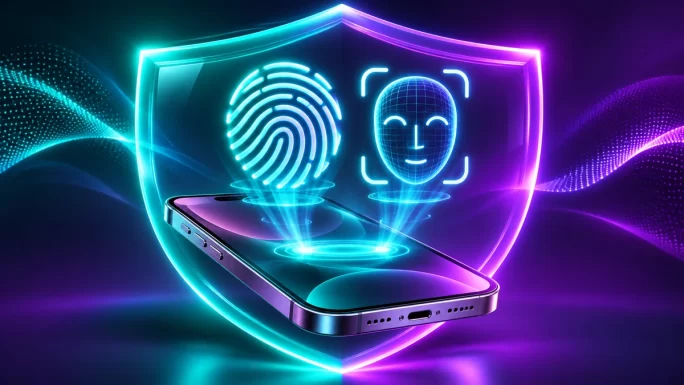
If your iPhone is lost, you can suspend Apple Pay remotely through Find My. Your cards stay in the bank as normal, but the phone can no longer use them.
Why Gift Card Shops Like Apple Pay
Gift cards are popular with fraudsters, because a code can be used almost like cash. That is why shops selling them often check payments more closely than a regular online store.
Apple Pay helps here. Each payment is tied to a real device and confirmed with biometrics, which makes it far harder to pay with stolen card details. As a result, Apple Pay orders tend to pass checks quickly, and the code reaches you faster.
For you as a buyer, there is another benefit: your card number is never stored on the shop server. Even if a site you used were ever breached, your card details would not be there to steal.
That said, a manual review can still happen on unusual orders. Our guide to account verification explains why shops sometimes ask for extra checks and how long they take.
Which Card in Your Wallet Pays
Apple Pay can hold several cards, and the one on top of your Wallet pays by default. On the payment sheet, you can tap the card to choose another one.
- Debit card: money leaves your bank account immediately, with no extra charges from most banks.
- Credit card: the amount goes on your credit balance; a few issuers treat gift card purchases as cash advances.
- Multi-currency card: Revolut, Wise and similar cards can reduce conversion costs.
The cash advance point is easy to miss. If your bank charges a fee for cash-like purchases, a gift card order could cost more than you expect, so a debit card is often the safer choice.
Also, a card blocked for online or international payments stays blocked inside Apple Pay. Check those settings in your banking app if a payment fails without a clear reason.
Gift Cards Worth Buying With Apple Pay
Apple Pay works for the whole catalogue. Still, a few gift cards are especially popular with iPhone owners:
- Apple Gift Card: apps, games, iCloud+ and Apple Music, in 26 regions.
- PlayStation cards: PSN wallet credit for games and subscriptions.
- Streaming cards: Netflix and similar services without a card on file.
- Payment vouchers: prepaid codes for paying online elsewhere without a bank card.
26 regions
Apple Gift Card
Credit for the App Store, iCloud+, Apple Music and more. Pick the card for your Apple Account country.
Buy Apple Gift CardConsole players often pay with Apple Pay on their phone while the PlayStation is still loading. The code is ready to redeem before the home screen appears.
37 regions
PlayStation Gift Card
PSN wallet credit for games, add-ons and subscriptions. Choose the card for your PlayStation account region.
Buy PlayStation Gift CardYou can browse everything in our gift cards and gaming cards sections. For prepaid ways to pay elsewhere, see our payment cards, and if you are into digital assets, our crypto gift cards.
Apple Pay Missing or Failing
When Apple Pay does not appear or a payment fails, the reason is usually quick to find.
Apple Pay problems and fixes
| What happens | Likely cause | Fix |
|---|---|---|
| No Apple Pay option | Unsupported browser or device | Open the page in Safari |
| Option shows, sheet will not open | Wallet has no eligible card | Add a card in the Wallet app |
| Payment declined | Bank blocks online or foreign payments | Allow them in your banking app |
| Declined after Face ID | Bank fraud check on a gift card order | Approve the payment in your bank app, then retry |
| Mac shows no prompt | iPhone locked or Bluetooth off | Unlock the iPhone and keep it nearby |
Do not retry many times in a row. Several quick attempts can make your bank more cautious, and the next payment may then fail too. After two failures, wait a few minutes or contact your bank.
If money left your account but no order appears, do not pay again. Instead, send our support team the time and amount, so we can match the payment and deliver your code.
Fees, Currency and Your Bank Statement
Apple does not charge you anything for using Apple Pay. Any extra cost comes from your bank, usually because of currency conversion.
For example, if your card is in Czech koruna and the order is in euros, your bank converts the amount at its own rate. That rate may include a margin, and some banks add a foreign transaction fee. Paying in your own currency, or with a multi-currency card, keeps this to a minimum.
On your bank statement, an Apple Pay payment looks like a normal card payment to the shop. Your banking app may also mark it with a small Apple Pay label, depending on the bank.
Remember, too, that the payment currency and the gift card region are not linked. You can pay in pounds for a card meant for the United States; the region only controls where the code can be redeemed.
Gift Cards With Apple Pay for Family and Friends
Apple Pay is ideal for last-minute presents. You pay on your own phone, and the code lands in your inbox, ready to pass on.
- Match the region: an Apple Gift Card must match the country of the recipient Apple Account.
- Choose a round value: enough for a game, a few months of a subscription or a new app.
- Deliver it personally: copy the code into a message or a card instead of forwarding the order email.
Parents use this a lot, too. Rather than adding their own card to a child’s device, they buy a gift card with Apple Pay and redeem it on the family member’s account. As a result, spending stays limited to the card value.
Because nothing ships, a digital gift card also works when the birthday is tonight and the shops are closed. For more inspiration, browse our gift card catalogue by brand.
Prefer another payment method? We also accept cards, Google Pay, PayPal, Skrill, crypto and many local options. Our guides to buying with Google Pay and buying with PayPal cover those in detail.
Frequently Asked Questions
Yes. TopGift accepts Apple Pay at checkout. Choose it, confirm with Face ID, Touch ID or your passcode, and the code arrives by email within minutes.
No. Apple Pay is a way to pay with your saved bank card. An Apple Gift Card adds credit to your Apple Account, which can only be spent with Apple.
No. Apple Account balance only works for Apple purchases such as apps, iCloud and Apple Music. It never appears as an Apple Pay option on other sites.
Not directly. Some browsers on a computer show a code to scan with your iPhone, but on most Windows PCs you will need another payment method.
No. Apple Pay is free to use. Your bank may still charge for currency conversion, and some credit cards treat gift card orders as cash advances.
Yes. Shops never receive your card number, and every payment needs Face ID, Touch ID or your passcode on your own device.
Key Takeaways