Sending crypto to a friend usually means copying a long wallet address, picking the right network and paying a fee. With Binance Pay, you skip all of that. If your friend also uses Binance, you can send crypto to their email, phone number or Binance ID, and it arrives almost instantly.
This guide explains what Binance Pay is, how it compares with a normal withdrawal and how to send crypto step by step. It also covers Red Packets for gifts, the limits you should know about and a few safety checks before you tap Confirm.
What Binance Pay Is
Binance Pay is a payment feature built into the Binance app. It moves crypto from one Binance account to another, so nothing goes through the blockchain. That’s why there’s no gas fee, and why transfers usually arrive within seconds.
According to Binance, more than 400 cryptocurrencies are supported for transfers between people. You can use it to send crypto to friends and family, split costs or pay merchants that accept it.
The only catch is that both of you need a Binance account. For anyone else, a regular withdrawal or a gift card works better.
Binance Pay vs a Regular Withdrawal
Both options move crypto out of your account, but they work very differently. Here’s how they compare:
| Feature | Binance Pay | Regular withdrawal |
|---|---|---|
| Who can receive it | Another Binance user | Any wallet or exchange |
| What you enter | Email, phone or Binance ID | Wallet address and network |
| Gas fee | None | A network fee applies |
| Speed | Usually instant | Minutes, depending on the network |
| Wrong-network risk | None | Funds can be lost |
In short, Pay is the easy option between Binance users. If your friend uses another app or a personal wallet, you’ll need a regular withdrawal instead, and our guide on how to withdraw crypto from Binance walks you through it.
What You Need Before You Send
Before your first transfer, check these three things:
- Identity verification on both sides: sending or receiving by email, phone or Binance ID requires a verified account.
- A Pay PIN or 2FA: Binance asks for one of them to approve every payment.
- Enough balance: you can pay from your Funding account, your Spot account or Simple Earn Flexible. Fixed Earn products can’t be used.
If you’re not sure where your coins are, our guide to the Funding wallet vs Spot wallet explains the difference.
How to Send Crypto With Binance Pay
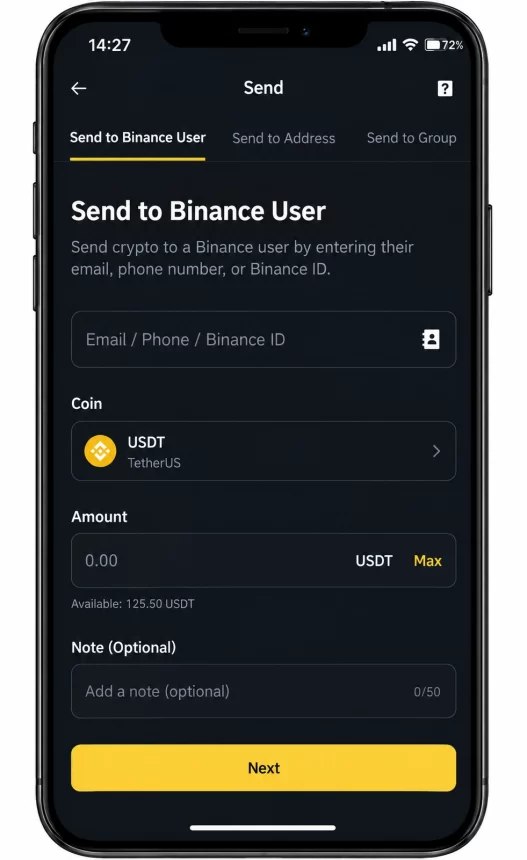
Here’s how it works in the Binance app:
The crypto lands in your friend’s Funding account right away. On the website, the path is More, then Pay, then Send, where you first add your friend as a payee.
You can also pay by QR code. Ask your friend to open their Binance Pay QR code, scan it with the scanner on the app’s home screen and confirm the payment.
Send Crypto as a Gift With a Red Packet
The app also has a fun extra called Red Packet. You choose a coin, the total amount and how many people can claim it. Each person then gets a random share until the packet is empty.
It’s a popular way to share crypto in group chats or on special occasions. Your friends still need a Binance account to claim it, though.
If the person you want to surprise doesn’t use Binance yet, a gift card is the simpler choice. A Binance Gift Card is just a code, so you can send it by message or email, and they redeem it after creating an account. Our guide on how to gift crypto to someone with no wallet shows the whole process.
How to Receive Crypto With Binance Pay
Receiving is even easier than sending. Your friend only needs one of your details: the email or phone number linked to your Binance account, or your Binance ID. You’ll find the ID in your profile in the app.
Alternatively, open the Pay section and show your QR code, so your friend can scan it and send the crypto straight away. Either way, the coins appear in your Funding account, and from there you can keep them, swap them or move them to Spot.
Just remember that your account needs to be verified to receive payments. If a friend says the transfer failed, check that first.
Limits and Safety Tips
There’s also a monthly sending limit. You can check yours in the app under Pay, then the plus icon, then Settings and My Pay Limits.
A few safety rules matter more than any limit:
- Check the recipient before you confirm. A transfer to the wrong email or ID can’t be recovered.
- Protect your Pay PIN. After five wrong attempts, Binance locks it for five hours.
- Never send crypto to strangers who promise returns. Fake investment offers and “support agents” asking for a transfer are common scams.
ImportantBinance Pay transfers can’t be reversed. If you send crypto to the wrong person, Binance can’t pull it back for you.
For more warning signs, see our overview of common crypto scams aimed at beginners. This guide explains how Binance Pay works, but it isn’t financial advice.
Frequently Asked Questions
Binance Pay is a feature in the Binance app that sends crypto from one Binance account to another. Transfers use an email, phone number, Binance ID or QR code instead of a wallet address.
Binance says you can send crypto to friends with Binance Pay without any gas fees, because the transfer stays inside Binance and doesn’t go through the blockchain.
Not with Binance Pay, because both sides need a verified Binance account. For anyone else, use a regular withdrawal to their wallet or send them a Binance Gift Card code.
Binance Pay transfers are usually instant. The crypto appears in the recipient’s Funding account as soon as you confirm the payment.
No. Once you confirm a payment, it can’t be cancelled or reversed. Always check the recipient’s details before you tap Confirm.
Yes. Binance Pay has a monthly sending limit. You can see your own limit in the app under Pay, then Settings and My Pay Limits.
Key Takeaways