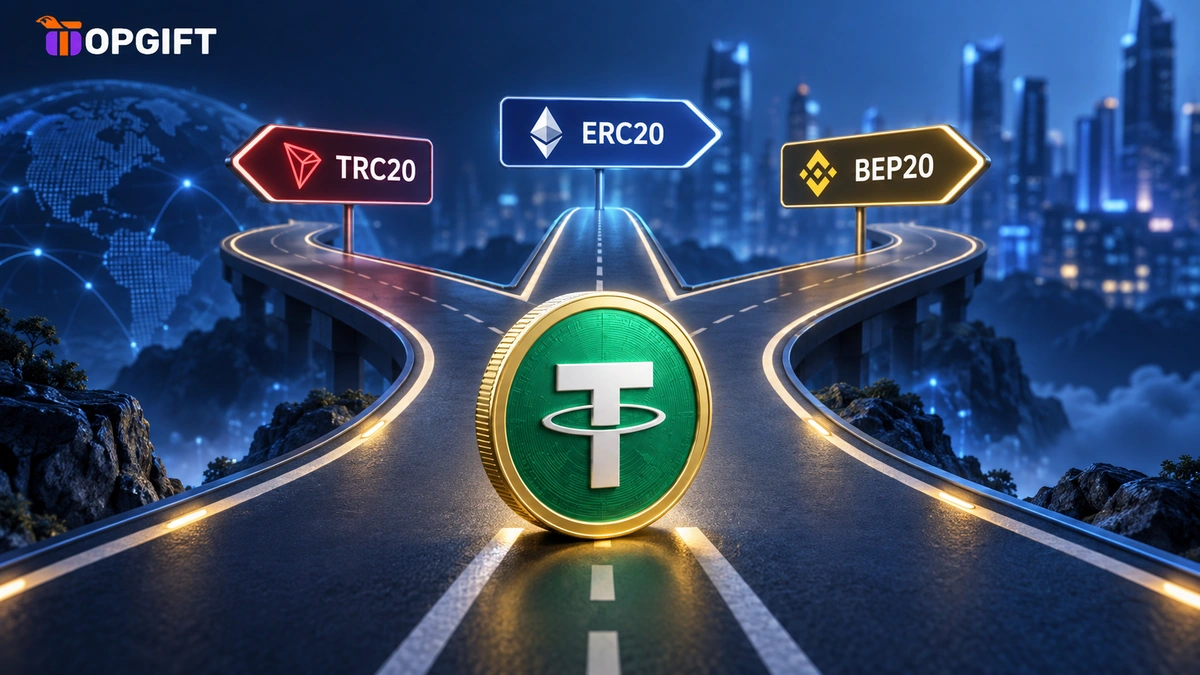
Every time you withdraw USDT from an exchange, you face the same small drop-down menu. ERC20, TRC20, BEP20, sometimes Arbitrum, Solana and a few more. Pick well, and the transfer costs a few cents and arrives in under a minute. Pick badly, and you pay ten times more in fees. Pick the wrong one entirely, and the money may never arrive at all.
This guide explains what these three networks actually are, how they compare on fees and speed in 2026, and why one of them is currently the easy default for most transfers. It also covers two things that confuse almost everyone: why some of your deposit addresses look identical, and why exchanges double-check where your money is going.
In this guide
- Same Coin, Different Roads
- ERC20 on Ethereum
- TRC20 on Tron
- BEP20 on BNB Smart Chain
- The Three Networks Side by Side
- Where Solana, Arbitrum and TON Fit
- Why Your BEP20 and Arbitrum Address Are the Same
- Reading the Withdrawal Screen
- Sending USDT From One Exchange to Another
- Why Exchanges Check Your Withdrawal Address
- What Happens If You Pick the Wrong Network
- The Gas Token Nobody Mentions
- Which Network Should You Choose
- Getting USDT Without a Bank Card
- Frequently Asked Questions
Same Coin, Different Roads
USDT is a stablecoin worth one US dollar. It exists on many blockchains at once. ERC20, TRC20 and BEP20 are simply the names of the token standards on three of those blockchains: Ethereum, Tron and BNB Smart Chain.
A simple way to picture it: USDT is the parcel, and the network is the road it travels on. One USDT on Tron and one USDT on BNB Smart Chain are worth exactly the same. However, they live on separate roads that don’t connect. A parcel sent down one road can only be collected at the end of that same road.
That is the whole reason the network choice matters. The sender and the receiver must use the same network. Everything else in this guide follows from that single rule.
ERC20 on Ethereum
ERC20 is the original. USDT first launched at scale on Ethereum, and the ERC20 standard still underpins most decentralised finance. Lending apps, trading protocols and many hardware wallets treat ERC20 as their home ground.
The downside is cost. Every transaction on Ethereum pays a gas fee, and that fee rises when the network is busy. A USDT transfer can cost several dollars on a quiet day, and noticeably more during peaks. Exchanges pass that cost on to you as a withdrawal fee.
Speed is also slower in practice. Ethereum produces a block roughly every twelve seconds. Exchanges then wait for a number of confirmations before crediting a deposit, so the full journey often takes several minutes.
ERC20 still makes sense in specific cases. You need it for Ethereum-based apps, and some institutions and wallets only accept it. For a simple move between two exchanges, though, it is usually the most expensive choice on the menu.
TRC20 on Tron
TRC20 became the everyday workhorse of USDT for years. Tron produces a block about every three seconds, and transfers are cheap compared to Ethereum. As a result, TRC20 is supported by almost every exchange, OTC desk and payment service that handles USDT.
On exchanges, a TRC20 withdrawal fee typically sits around one USDT. That is far cheaper than ERC20, though it adds up if you move money often. From a self-custody wallet, the cost depends on the energy and bandwidth resources Tron uses, which can be confusing for beginners.
The biggest strength of TRC20 is reach. If you are sending USDT to a small exchange, a local service or a person who has only ever used one network, TRC20 is the one most likely to work on their side.
BEP20 on BNB Smart Chain
BEP20 is the standard on BNB Smart Chain, the network built by the Binance ecosystem. On most exchanges it appears as BSC, BNB Smart Chain or BEP20. These are three names for the same thing.
Right now, BEP20 is the fastest and cheapest of the three. A transfer usually costs a few cents, and some exchanges charge almost nothing to withdraw USDT on BEP20. Blocks arrive every few seconds, and exchanges typically credit a deposit in under a minute. For moving USDT between major exchanges, it is hard to beat.
There is one practical caveat. BEP20 is widely supported by large exchanges, but some smaller platforms and payment services still don’t accept it. Before choosing it, always confirm that the receiving side lists BEP20 for USDT.
One more naming trap is worth knowing. BEP20 is not the same as BEP2. BEP2 belonged to the older BNB Beacon Chain, which has since been retired. If you ever see BEP2 on an old guide or screenshot, ignore it.
The Three Networks Side by Side
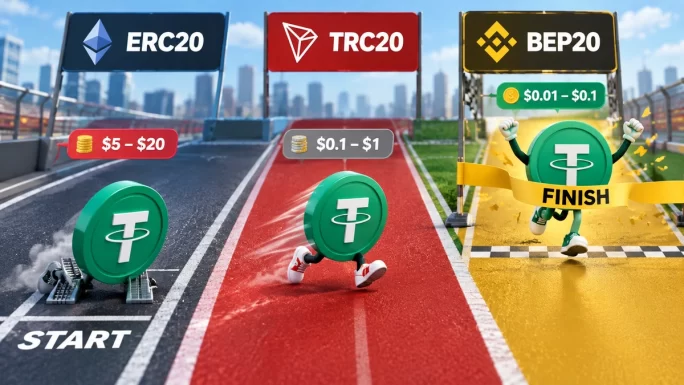
Here is how the three compare for an ordinary USDT transfer in 2026. Exact fees change with network conditions and differ between exchanges, so treat these as rough ranges rather than fixed prices.
| Network | Blockchain | Typical fee | Typical speed | Address starts with | Best for |
|---|---|---|---|---|---|
| ERC20 | Ethereum | Several dollars, more when busy | A few minutes | 0x | Ethereum apps and DeFi |
| TRC20 | Tron | Around 1 USDT | About a minute | T | Widest platform support |
| BEP20 | BNB Smart Chain | A few cents | Under a minute | 0x | Cheap, fast exchange transfers |
The pattern is clear. ERC20 is the premium road, TRC20 is the reliable everyday road, and BEP20 is currently the fastest and cheapest of the three.
Where Solana, Arbitrum and TON Fit
These three aren’t the only options on the menu, and it would be unfair to pretend otherwise. USDT also lives on several newer networks, and some of them are just as cheap as BEP20.
Solana is very fast and very cheap, with transfers settling in about a second for a fraction of a cent. Its addresses use their own format, so they never match your BEP20 or TRC20 ones. Exchange support has grown a lot, but it is still less universal than TRC20.
Arbitrum, Base and Optimism are layer-2 networks built on top of Ethereum. They inherit Ethereum’s security while cutting fees to cents. Because they are EVM networks, they share the same 0x address as BEP20 and ERC20. That makes them convenient, but it also makes the network mix-up described below easier to fall into.
TON is the network behind Telegram’s built-in wallet. It is cheap and increasingly popular for sending USDT to friends. When depositing TON-based USDT to an exchange, though, you often need to include a memo, which trips up many first-timers.
Any of these can be a good choice when both sides support them. For everyday transfers between major exchanges, however, BEP20 remains the simplest default, because almost every large platform supports it.
Why Your BEP20 and Arbitrum Address Are the Same
Sooner or later, you will notice something that looks like a bug. You open the deposit page on an exchange, choose USDT on BEP20, and copy the address. Then you switch to Arbitrum, and the address is exactly the same. Switch to ERC20, and again, the same address.
This is completely normal. BNB Smart Chain, Ethereum, Arbitrum, Polygon, Base and Optimism all use the same address format, because they are built on the same technology, known as the Ethereum Virtual Machine, or EVM. On all of these networks, an address starts with 0x and follows identical rules. One private key controls the same address on every one of them.
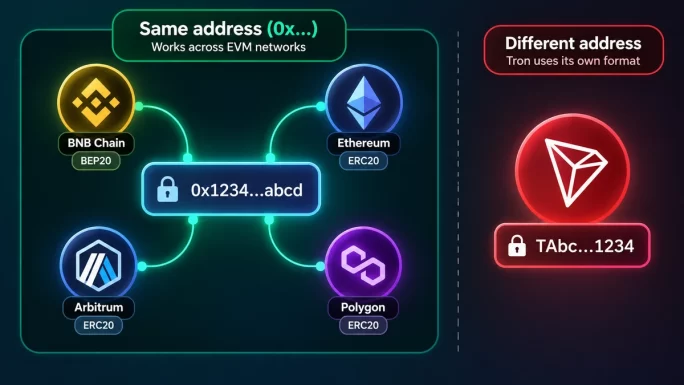
Tron is different. Tron addresses start with the letter T, so a TRC20 address will never match your BEP20 one. Solana uses yet another format.
The shared address is convenient, but it hides a trap. Because the addresses look identical, the address itself can’t tell you which network to use. A BEP20 address will happily accept a transfer sent over Ethereum or Arbitrum. The funds then arrive on a network the receiving exchange might not be watching. So the address being the same is fine. Picking the network carelessly is not.
Reading the Withdrawal Screen
Before any transfer, it helps to know what each field on a withdrawal screen actually means. The layout differs between exchanges, but the pieces are the same.
The coin field is simple: you choose USDT. The network field comes next, and it is the one that matters most. Some exchanges fill it in automatically based on the address you paste. Never trust that blindly. Always check which network is selected before you confirm.
The address field is where you paste the destination. Always copy it straight from the receiving platform’s deposit page. Never type it by hand, and never copy it from a chat message or an email. Some malware even swaps a copied address for a scammer’s one, so compare the first and last few characters after pasting.
Some screens also show a memo or tag field. USDT on ERC20, TRC20 and BEP20 doesn’t use one. However, other networks sometimes do, TON in particular. If the receiving deposit page shows a memo, you must include it, or the deposit may not be credited.
Finally, look at the fee and the amount you will receive. The receive amount is what actually arrives, after the withdrawal fee. Many exchanges also set a minimum withdrawal, which is often higher on expensive networks like ERC20.
Sending USDT From One Exchange to Another
Moving USDT between two exchanges is the most common reason people meet this menu at all. A careful routine takes one extra minute and removes almost all of the risk.
- Check the receiving exchange first — open its deposit page, choose USDT, and see which networks it lists.
- Pick a network both sides support — BEP20 if it is available on both, TRC20 if not.
- Copy the deposit address for that exact network, plus the memo if one is shown.
- Paste it on the sending exchange and select the same network, then compare the first and last characters.
- Send a small test amount first, wait until it arrives, then send the rest.
- Answer the address check questions honestly if the exchange asks where the funds are going.
That small test transfer is the cheapest insurance in crypto, especially on BEP20, where it costs next to nothing.
Why Exchanges Check Your Withdrawal Address
When you withdraw from one exchange to another, you may be asked extra questions. Which platform does this address belong to? Is it your own account? What is the recipient’s name? Sometimes the withdrawal also sits in review for a short while before it leaves.
This is normal, and it is not a sign that anything is wrong with your account. In the EU, crypto platforms must follow the so-called travel rule, which requires them to collect and share basic sender and recipient information for transfers. Exchanges elsewhere run similar checks. They also screen destination addresses against known scam and hack wallets.
The receiving exchange checks too. It may ask where the funds came from before crediting them. Answer honestly, and make sure the details match your own account on the other platform. Most checks clear within minutes.
These checks are also a small safety net for you. A pause before a large withdrawal gives you one last chance to spot a mistyped address or the wrong network.
What Happens If You Pick the Wrong Network
The outcome depends on which mistake you made, and some are far worse than others.
If the network isn’t supported at all, the exchange usually stops you. You can’t select TRC20 when sending to an address that starts with 0x, because the format doesn’t match. This is the most common mistake, and the system blocks it for you.
The dangerous case is the EVM mix-up. Say you send USDT over Arbitrum to an exchange address that was meant for BEP20. The address is valid on both networks, so the transfer goes through. The funds then land on Arbitrum, at an address the exchange may not monitor for that network. The deposit simply never shows up.
Whether you get it back depends on who controls the address. If it is your own self-custody wallet, the funds are usually still yours. You just need to switch the wallet to the right network to see them. If it is an exchange, only the exchange can recover them. Some offer a recovery service, often with a fee and a wait. Others can’t recover certain networks at all.
If this happens, contact the receiving exchange’s support straight away with the transaction ID. Don’t send more funds to “test” it, and don’t trust anyone who contacts you offering to recover them for a fee.
The Gas Token Nobody Mentions
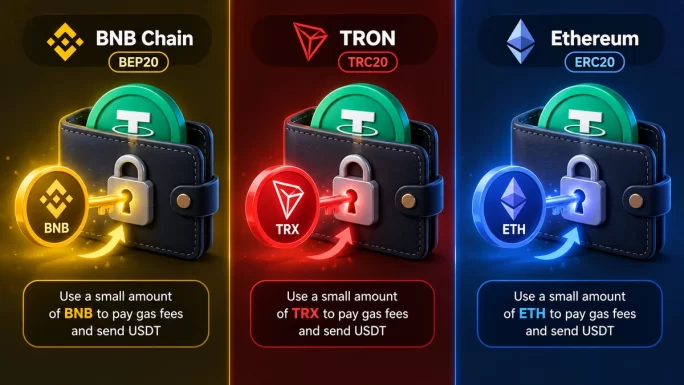
This catches out many people who move USDT to a wallet of their own. To send USDT on any network, you also need a small amount of that network’s own coin to pay the fee.
On BNB Smart Chain, that coin is BNB. On Tron, it is TRX. On Ethereum, it is ETH. Without it, your USDT is stuck. You can see the balance, but you can’t move it.
On an exchange, you never notice this, because the exchange pays the network fee and charges you a withdrawal fee instead. In your own wallet, though, keeping a few dollars’ worth of the gas coin next to your USDT saves a lot of frustration later.
Which Network Should You Choose
For most people, the choice comes down to a short checklist.
If both sides support BEP20, use BEP20. In 2026 it is the cheapest and fastest of the three, and for transfers between major exchanges it is the sensible default.
If the receiving side doesn’t support BEP20, use TRC20. It costs a little more but works almost everywhere.
Use ERC20 only when you actually need Ethereum. That means a DeFi app, a wallet or a service that accepts nothing else. Otherwise, you are paying extra for features you won’t use.
Whatever you pick, the only rule that truly matters is the same one from the start. The sender and the receiver must use the same network.
Getting USDT Without a Bank Card
All of this assumes you already hold some USDT. If you don’t, the first step is usually buying it on an exchange. That is exactly where many people hit a declined bank card or a bank that blocks crypto payments.
A Binance Gift Card is a simple way around that. You redeem a prepaid code on Binance, and the balance lands in your account. From there, you can withdraw it on BEP20 for a few cents, using the routine above. Our redemption walkthrough covers that first step in detail.
The full Binance Gift Card range is available in several amounts.
Shop Binance Gift Cards →Frequently Asked Questions
Which USDT network is the cheapest?
Among ERC20, TRC20 and BEP20, BEP20 is currently the cheapest, usually costing a few cents per transfer. TRC20 typically costs around one USDT on exchanges, and ERC20 costs several dollars or more.
Is it normal that my BEP20 and Arbitrum addresses are the same?
Yes. Both networks use the same address format, as do Ethereum, Polygon, Base and Optimism. The address is identical, so always choose the network carefully rather than relying on the address.
Why does the exchange ask where I am sending my withdrawal?
Exchanges must collect basic sender and recipient details for crypto transfers, and they screen addresses for scams. The questions are routine and usually clear within minutes.
Can I send TRC20 USDT to a BEP20 address?
No. The address formats don’t match, so most platforms block the attempt. Both sides must use the same network.
I sent USDT on the wrong network. Is it lost?
Not always. In your own wallet, switching to the correct network usually reveals the funds. On an exchange, contact support with the transaction ID. Some exchanges can recover it, sometimes for a fee.
Why can’t I send USDT from my wallet?
You probably have no gas coin. Sending USDT needs a small amount of BNB on BEP20, TRX on TRC20 or ETH on ERC20 to pay the network fee.
🔑 Key takeaways
- Sender and receiver must always use the same network — that is the one rule that matters.
- BEP20 is currently the fastest and cheapest of the three for most exchange transfers.
- TRC20 costs a little more but works almost everywhere; ERC20 is for Ethereum apps.
- Identical BEP20, Arbitrum and ERC20 addresses are normal — so always check the network, not the address.
- Address checks and short reviews on withdrawals are routine, not a problem with your account.
- In your own wallet, keep a little BNB, TRX or ETH to pay network fees.