
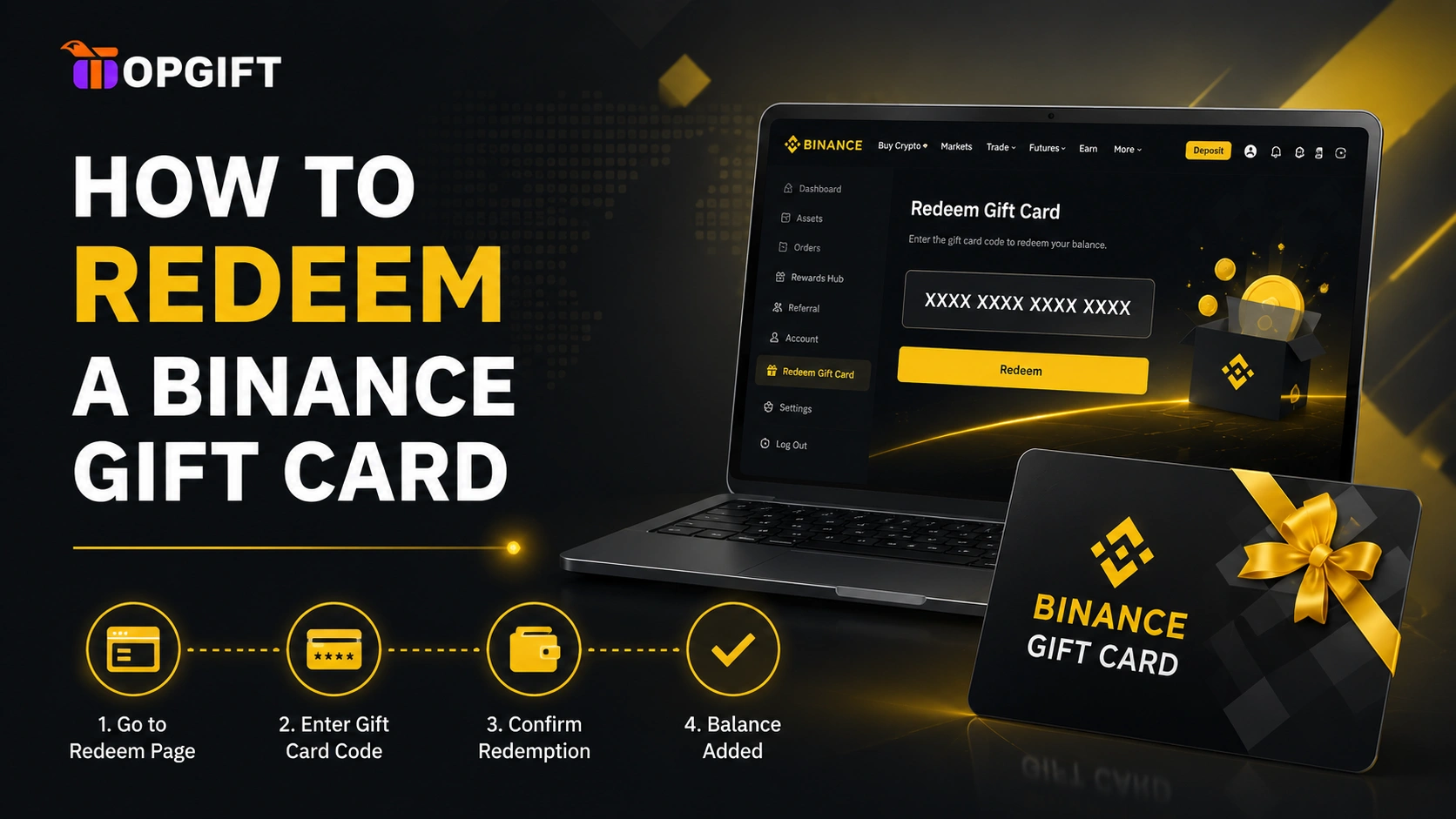
Redeeming takes about thirty seconds once you know where the button is. The trouble is that almost nobody finds it first time — it hides in a menu most people never open, and there’s one requirement nobody warns you about until the code refuses to go through.
This guide covers both routes, app and desktop, plus the handful of reasons a code fails and what to do about each. If you already have your code to hand, skip to whichever section matches the device you’re on.
Table of Contents
- What You Need Before You Start
- Redeeming in the Binance App
- Redeeming on the Binance Website
- Checking a Card’s Balance
- Where Your Crypto Actually Lands
- If Your Code Won’t Redeem
- Only Ever Redeem on Binance
- Frequently Asked Questions
- Ready to Buy One?
What You Need Before You Start
Two things, and the second one catches people out.
Your 16-character code. If you bought from TopGift, it’s in your account dashboard and on your order confirmation page. We never send codes by email — that’s deliberate, since email is the easiest place for someone to intercept a code.
A verified Binance account. This is the requirement that trips most people up. Binance only allows identity-verified accounts to redeem gift cards. If you haven’t completed verification, the code won’t work no matter how many times you retype it — and since codes are single-use, it’s worth finishing verification before you buy rather than after.
That’s it. No wallet address, no network selection, no gas fee to budget for.
Redeeming in the Binance App
Five steps. Getting to the Gift Card section takes three of them, which explains why so many people assume the feature doesn’t exist.
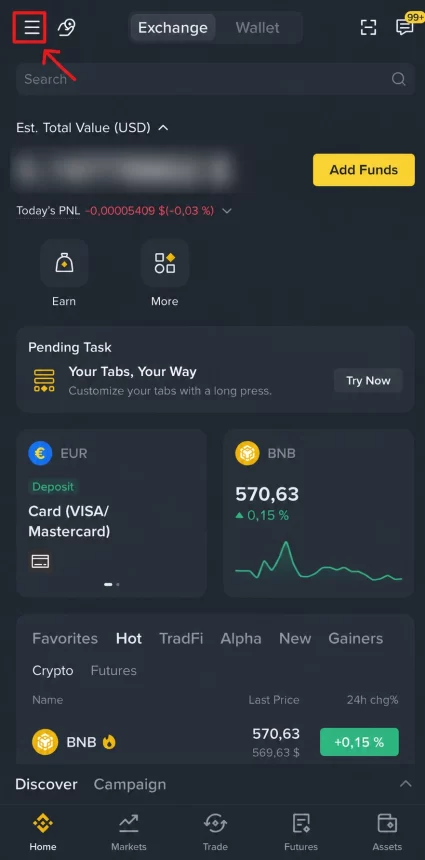
Step 1 — Open the menu
Log in and tap the menu icon in the top-left corner of the home screen.
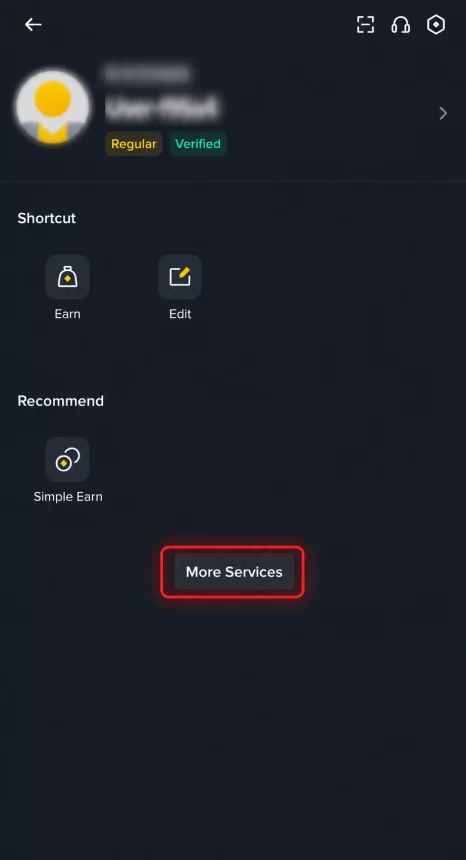
Step 2 — Tap More Services
Scroll down your profile panel and choose More Services. Binance keeps most of its features here rather than on the home screen, and Gift Card is one of them.
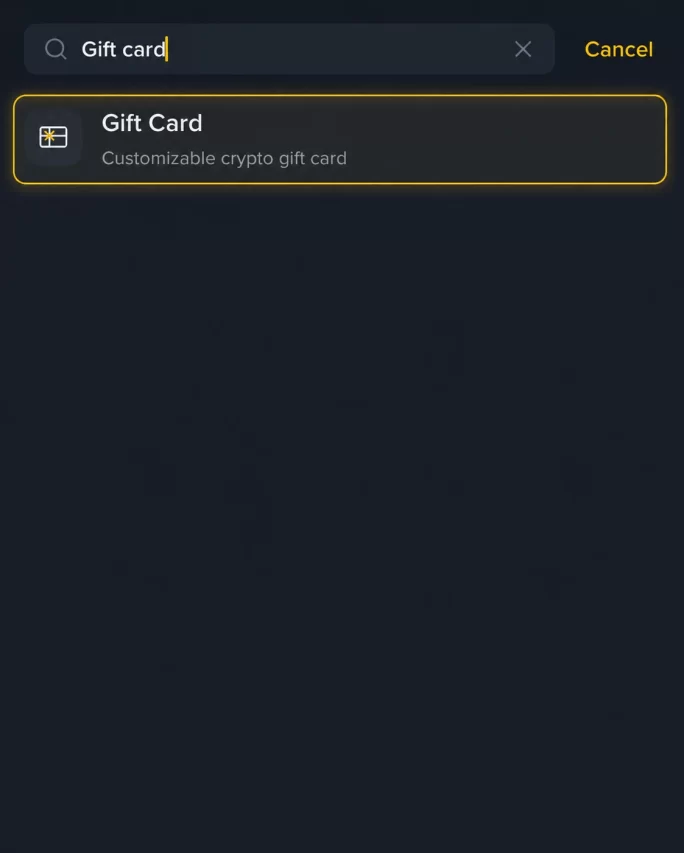
Step 3 — Find Gift Card
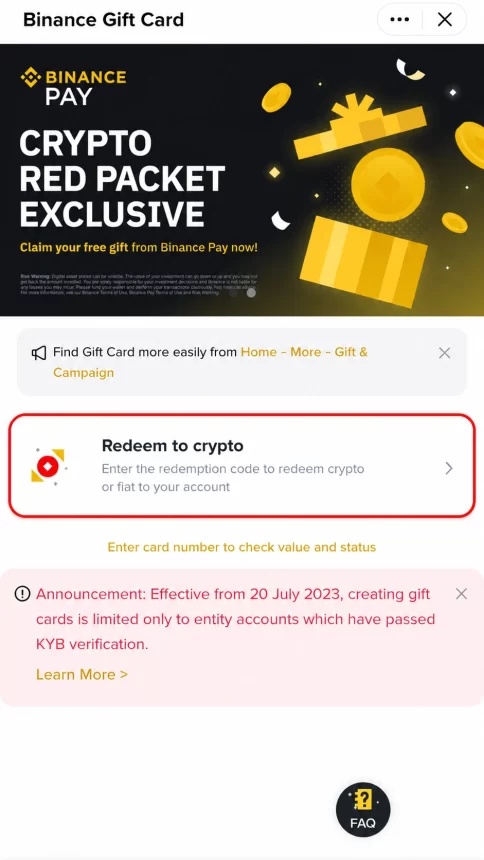
Type “Gift card” into the search field and tap the result. Worth noting for next time: the app also offers a shortcut through Home → More → Gift & Campaign, which skips a step once you know it’s there.
Step 4 — Choose Redeem to crypto
Tap Redeem to crypto to credit the funds to your account. The same screen carries an option to enter a card number and check its value and status — a genuinely useful feature that almost nobody knows about, covered further down.
Step 5 — Enter your code and redeem
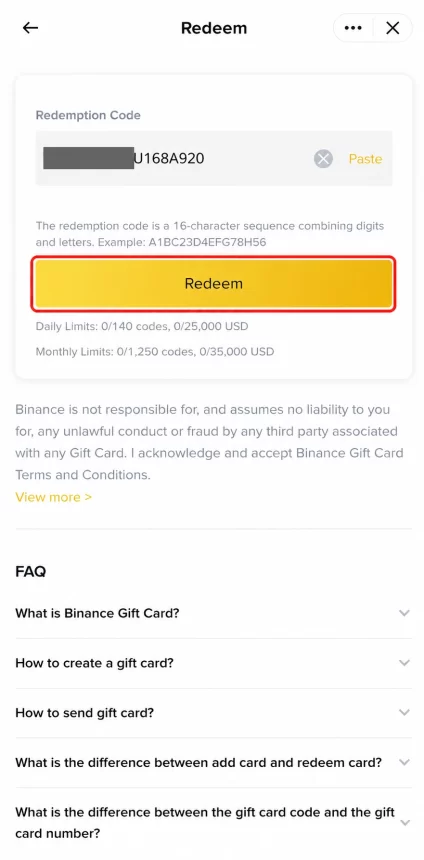
Type or paste the 16-character code, then tap Redeem. The crypto reaches your account immediately, with no processing delay and no confirmation email to wait for. This screen also displays your daily and monthly redemption limits, which run high enough that ordinary use never touches them.
Redeeming on the Binance Website
The desktop route is shorter, but the entry point is genuinely hard to find, which is why so many people give up and assume their code is faulty. Skip the hunt by going straight to Binance’s Gift Card page, which handles redemption directly.
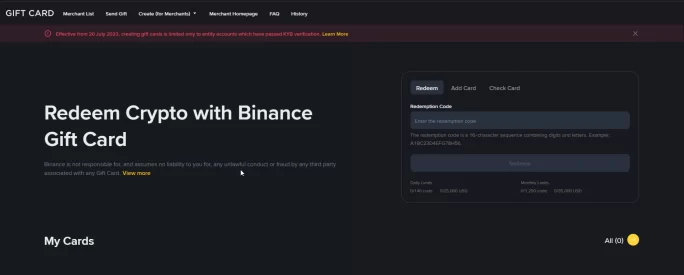
- Log in to your Binance account.
- Open the Gift Card page. If you’d rather navigate there yourself, scroll to the bottom of any Binance page and click Gift Card in the footer, or type “Gift Card” into the search bar.
- Enter your redemption code and click Redeem.
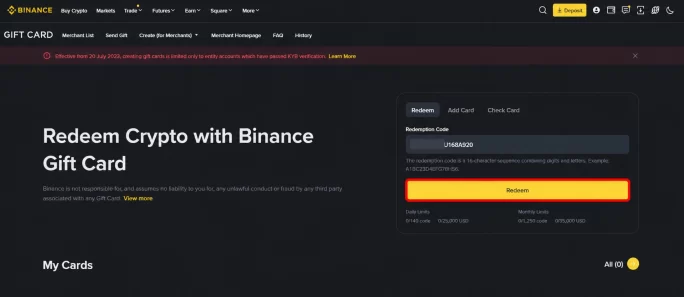
The funds land in your wallet straight away, exactly as with the app. Either route produces the same result, so use whichever device you happen to have open.
Checking a Card’s Balance
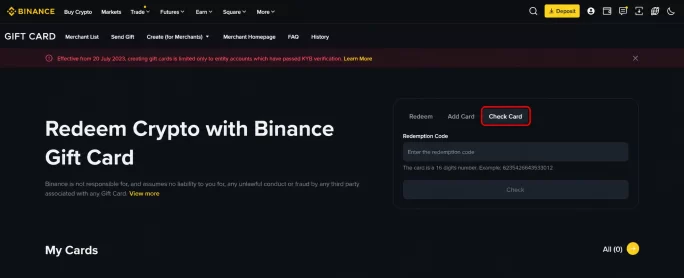
Both the app and the website do something most people never discover. Alongside redemption, either one will tell you what a card is worth and whether anyone has already used it — and both do this from the card number, not the redemption code. In the app you’ll find it on the same screen as Redeem to crypto.
That distinction matters. Checking a balance costs you nothing and reveals nothing, because the card number alone can’t be redeemed. So if you bought a card months ago and can’t remember whether you used it, check rather than guess. And if you have any doubt about where a code came from, the balance tells you its status before you commit it to anything.
Where Your Crypto Actually Lands
Your crypto goes into your Funding Wallet, not your Spot Wallet. This confuses a lot of first-timers, who redeem successfully, open their trading screen, and see a balance of zero.
Nothing has gone wrong. Binance separates wallets by purpose: the Funding Wallet holds money that has arrived from outside — P2P trades, gift cards, deposits — while the Spot Wallet is what trading draws from. Moving between them is instant and free, via the Transfer button in your wallet overview.
One detail worth knowing, because it isn’t obvious: redeeming a gift card costs no network fee. A normal on-chain transfer charges you to move crypto between wallets, and on some networks that fee runs to actual dollars. Gift card redemption happens inside Binance, so it deducts nothing. The full value arrives — which matters most on the smaller amounts, where a network fee could eat a noticeable share of what you bought.
If Your Code Won’t Redeem
Codes fail for a small number of reasons, and most are fixable.
Your account isn’t verified. By far the most common cause. Complete identity verification in your Binance profile, then try again — a failed attempt doesn’t consume the code.
The code was mistyped. Sixteen characters is enough to fumble. Copy and paste rather than typing, and watch for a trailing space when pasting, which is easy to include and invisible on screen.
Someone already redeemed it. Gift card codes work once. If you’ve shared yours with anyone, or left it where another person could see it, they may have spent it already.
It has expired. Binance Gift Cards are valid for six months from creation. After that they can’t be redeemed, so don’t buy one to sit on indefinitely.
You’re on the wrong page. If you’re entering the code anywhere other than Binance itself, it will never work — see the next section, because this one matters more than it sounds.
If you’ve checked all five and the code still fails, contact whoever sold it to you rather than retrying repeatedly. TopGift customers can reach us through the support centre.
Only Ever Redeem on Binance
A gift card code is bearer value. Whoever enters it first gets the crypto, and there is no way to reverse that. Which is exactly why codes are a favourite target for scams.
The rule is simple and has no exceptions: enter your code on Binance and nowhere else. A support agent’s form doesn’t count. Neither does a “verification” page, a site promising to double your balance, or someone in a chat who needs it to “confirm your identity”. Any request for your code outside the Binance app or binance.com is a theft in progress, however legitimate it looks.
The same logic applies to buying. Someone may already have redeemed a code from an unofficial seller before it ever reaches you, and you’d have no way of knowing until it failed. Buying from a merchant that appears in Binance’s own merchant directory is the practical protection here. Our scam awareness page covers the wider patterns worth recognising.
Frequently Asked Questions
Do I need a verified Binance account to redeem?
Yes. Binance only permits identity-verified accounts to redeem gift cards. Complete verification before buying, since codes are single-use and a failed attempt is a wasted trip rather than a lost code.
How long does a Binance Gift Card last?
Six months from creation. After that it can no longer be redeemed, so buy one when you intend to use it rather than well in advance.
Does redeeming cost a fee?
No. Redemption happens inside Binance rather than on the blockchain, so there’s no network or gas fee. Your wallet receives the full value.
Why can’t I see my crypto after redeeming?
It’s in your Funding Wallet, not your Spot Wallet. Use the Transfer option in your wallet overview to move it across — the transfer is instant and free.
Can I redeem a gift card someone else bought for me?
Yes. Codes carry no link to the buyer’s account, so whoever holds one can redeem it into their own verified Binance account. That’s what makes gift cards a practical way to give crypto without needing the recipient’s wallet address.
Can I check whether a card has already been used?
Yes. Binance’s Gift Card page lets you look up a card’s balance and status using its card number rather than the redemption code, so you can check without spending anything.
Can I redeem a card now and use the crypto later?
You can add the card to your Binance account and leave it unredeemed until you want it, rather than crediting the crypto straight away. Bear in mind the six-month validity period runs regardless.
Can a code be used twice?
No. Each code works once and then stops. Treat it like cash and don’t share it with anyone you don’t intend to give the money to.
What if I entered my code on the wrong website?
If the site wasn’t Binance and someone has taken the code, the funds are gone and nobody can recover them. Report the site, and never enter a code anywhere other than the Binance app or binance.com.
Where do I find my code after buying from TopGift?
In your account dashboard and on your order confirmation page, available as soon as payment clears. We never send codes by email.
Ready to Buy One?
TopGift appears in Binance’s own merchant directory, so the codes we sell are genuine and redeem directly through Binance. Values run from $0.50 to $200 across more than fifty cryptocurrencies, and your code is available the moment payment clears.
Browse the full crypto range to pick a coin and an amount.