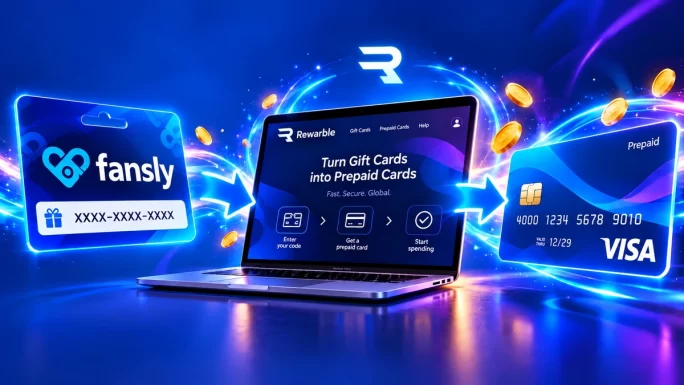
A Fansly gift card lets you pay for subscriptions, tips and content on Fansly without linking your own bank card. You buy a prepaid code, redeem it on Rewarble and get a prepaid Visa card that works on Fansly like any other card.
This guide explains how the card works from purchase to payment, which currency to pick and how to add the card to your account. It also covers subscriptions, fees, the most common problems and how to keep your code safe. Fansly is an 18+ platform, so you must be an adult to use it.
What a Fansly Gift Card Is
A Fansly gift card is a prepaid code issued through Rewarble, a redemption platform run by Centiward B.V. in the Netherlands. It is not a code you type into Fansly directly. Instead, you redeem it on the Rewarble website, which turns the value into a prepaid Visa card meant for Fansly payments.
That card comes with everything a normal card has: a 16-digit number, an expiry date and a security code. As a result, Fansly treats it like any other Visa card, so you can use it at checkout or save it as a payment method.
The key difference from a bank card is that the gift card only holds the amount you loaded. There is no bank account behind it and no credit line, so you can never spend more than the value of the code. If you want to learn more about the platform behind it, our guide to what Rewarble is explains both types of Rewarble cards.
Fansly gift card at a glance
How a Fansly Gift Card Works
The whole process has three stages: you buy the code, you turn it into a card on Rewarble and then you pay on Fansly. In practice it takes only a few minutes from start to finish.
From code to Fansly payment
After you redeem the code, the value first sits in your Rewarble balance. From there you create the Fansly card and decide how much of the balance to put on it. Because of this, you can also split a larger code into more than one card if you want separate cards for different subscriptions.
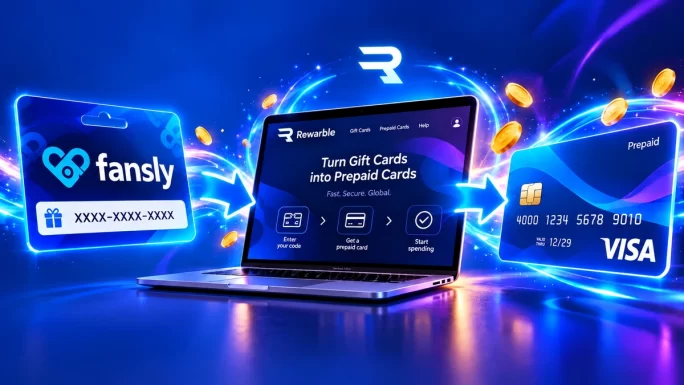
Once you have the card details, the rest works exactly like paying with a normal card. Fansly never sees your bank, your salary account or your main card, only the prepaid Visa card from Rewarble.
Why People Pay for Fansly With a Gift Card
Most people choose a Fansly gift card for one of three reasons: privacy, spending control or problems with their own bank card.
- Privacy. Your bank statement shows a one-time purchase from the gift card shop, not a recurring charge from the platform every month.
- Spending control. The card only holds what you loaded, so a forgotten subscription cannot keep charging you forever.
- Declined bank cards. Some banks block payments to adult platforms or to merchants in certain countries. A prepaid card usually avoids that problem.
- No bank card at all. If you do not have a credit or debit card, a gift card is one of the simplest ways to pay online.
For many users, the spending control matters most. Subscriptions on creator platforms renew automatically, and it is easy to lose track when you follow several creators. With a prepaid card, the budget is fixed from the start, and when the balance runs out, renewals simply stop.
Privacy is a close second. Some people share a bank account with a partner, while others simply prefer not to have adult platforms listed on their statements. Paying with a gift card keeps those purchases separate from everyday banking. Our article on paying online without a bank card covers more options like this.
Who a Fansly Gift Card Suits Best
A Fansly gift card is a good fit for several types of users. In particular, it works well for people who:
- want to keep creator subscriptions separate from their main bank account;
- share a bank account or card with someone else;
- have a bank that declines payments to adult platforms;
- prefer a fixed monthly budget instead of open-ended card payments;
- do not have a credit or debit card at all.
On the other hand, it is less practical if you pay many creators every month and never want to think about balances. In that case, you need to top up regularly, although splitting the budget across several cards can make that easier.
It is also worth remembering that the card only works for payments. You cannot withdraw the balance as cash or send it back to a bank account, so load only what you plan to spend on Fansly.
Which Currency to Choose
Fansly gift cards come in five currencies. Prices on Fansly are shown in US dollars, so the USD card is the simplest choice for most people, because the amount you load is the amount you can spend.
Fansly gift card currencies
| Currency | Best for | Amounts |
|---|---|---|
| USDBest pick | Most users, since Fansly prices are in dollars | $30, $50, $60, $100, $150 or a custom amount |
| EUR | Buyers in the eurozone who think in euros | €30, €50, €60, €100, €150 or a custom amount |
| GBP | Buyers in the UK | Custom amount |
| CAD | Buyers in Canada | Custom amount |
| AUD | Buyers in Australia | Custom amount |
If you choose a currency other than dollars, the value may be converted when you pay on Fansly. In that case, the final amount can differ slightly from the face value. Therefore, if you want an exact budget in dollars, the USD card is the safer option.
The fixed amounts also make it easy to plan. For example, a $30 card works well if you want to try one creator, while a $100 or $150 card suits people who follow several creators or like to send tips.
How to Redeem a Fansly Gift Card
Redeeming the code takes about two minutes. You do not need a Rewarble account, only a working email address for the confirmation.
Redeem your Fansly gift card
Save the card details somewhere safe, for example in a password manager. You will need them again if Fansly asks you to confirm the card, and also if you want to check the balance later.
Use the full codeType or paste the code in one go and check it before you confirm. Most redemption errors come from a missing character or an extra space at the end.
If you do not use the whole balance in one card, the rest stays in your Rewarble balance. You can then create another Fansly card later, for instance when a new month starts.
Adding the Card to Your Fansly Account
With the card details ready, adding the card to Fansly works the same way as adding any other Visa card. The exact menu names can change slightly over time, but the steps stay the same.
- Log in to your Fansly account in the browser or the app.
- Open your Settings and go to the payments section.
- Choose to add a new card.
- Enter the card number, expiry date and security code from Rewarble.
- Add a billing name and address, then save the card.
When you enter the billing details, use the same name and address you gave on Rewarble. A mismatch is one of the most common reasons why a payment fails, so it is worth double-checking before you save.
After that, the card appears in your saved payment methods. From then on, you can choose it at checkout whenever you subscribe, send a tip or buy content.
What You Can Pay For on Fansly
Once the card is saved, you can use it almost anywhere on Fansly where a card payment is possible:
- Subscriptions to creators, including longer bundles if a creator offers them.
- Tips to support a creator directly.
- Paid posts and messages that a creator has locked behind a price.
- Wallet top-ups, if you prefer to load money into your Fansly wallet first and pay from there.
Topping up the Fansly wallet is a handy option if you plan many small payments. Instead of charging the card each time, you load one amount and then pay tips and posts from the wallet balance. This also makes it easier to see how much you have spent in a month.
Using a Fansly Gift Card for Subscriptions
Subscriptions are where a prepaid card needs a little planning. A Fansly subscription renews automatically, and each renewal charges the saved card. If the balance is too low on that day, the renewal fails and you lose access until you pay again.
Watch the renewal dateCheck when each subscription renews and make sure the card or your Fansly wallet has enough money a day or two before. If you do not want a subscription to continue, turn off auto-renew instead of letting the payment fail.
There are two simple ways to handle this. First, you can keep enough balance on one card for all your renewals. Alternatively, you can create a separate card for each creator, so every subscription has its own budget. Many people prefer the second option, because it shows clearly where the money goes.
If you only want one month, a prepaid card is actually ideal. When the balance is used up, the subscription ends on its own and nothing renews by surprise.
Tips for Managing Your Fansly Budget
A prepaid card already gives you more control than a normal card, but a few habits make it even easier to stay on budget.
- Set a monthly amount and load only that, for example $50 at the start of each month.
- Use one card per creator if you follow several, so you always know what each subscription costs.
- Turn off auto-renew for subscriptions you only want for one month.
- Keep a simple note of renewal dates in your phone calendar.
- Use the Fansly wallet for tips and small purchases, so they come from one pot.
These steps take a few minutes to set up, but they save you from surprise renewals and failed payments later. Moreover, they make the end of each month predictable, which is exactly why many people choose a prepaid card in the first place.
Finally, review your active subscriptions every few weeks. Creators change their prices and bundles from time to time, so a quick check helps you decide where your budget is best spent.
Fees, Limits and Card Validity
The gift card itself is simple, but a few costs and limits are worth knowing before you buy.
Fees and limits to know
Always check the amount Rewarble shows before you confirm the card. That way you know exactly how much will be available on Fansly. In addition, note the expiry date of the card, because a card that has expired cannot pay for future renewals.
Unused codes should be redeemed soon after you buy them. It keeps your budget clear, and it also means you notice any problem with the code right away instead of weeks later.
Fansly Gift Card vs Other Payment Methods
A Fansly gift card is not the only way to pay, but it combines privacy and control better than most alternatives.
Ways to pay on Fansly
| Method | Bank card needed | Spending limit | Best for |
|---|---|---|---|
| Fansly gift cardBest pick | No | Fixed by the code | Privacy and budget control |
| Debit or credit card | Yes | Your account or credit limit | Regular payments without extra steps |
| Other prepaid cards | Sometimes | Fixed by the top-up | People who already use one |
| Virtual bank cards | Yes, linked to a bank | Your account balance | Separate online spending |
Normal debit and credit cards are the quickest option, but they show the platform on your statement and can be declined by some banks. Virtual cards from your bank give you a separate number, yet they are still linked to your account. Overall, a gift card is the only option on this list that keeps your bank completely out of the payment.
Common Problems and How to Fix Them
- The code is rejected on Rewarble. Check for typos and make sure you entered the full code. If it still fails, contact us with your order number.
- Fansly declines the card. Check that the billing name and address match what you entered on Rewarble, and that the card has enough balance.
- The payment is slightly higher than expected. If you used a non-USD card, currency conversion can change the final amount.
- A renewal failed. The card probably ran out of balance. Top up your Fansly wallet or add a new card, then renew the subscription.
- The card has expired. Create a new card from your Rewarble balance or redeem a new code.
Most problems come from a mismatch in the billing details or a balance that is too low. Fixing those two usually solves the issue in a few minutes.
How to Stay Safe
Like all prepaid codes, Fansly gift cards attract scammers, because whoever has the code can use it. Keep these rules in mind:
- Redeem the code yourself, only on rewarble.com.
- Never send the code or a photo of it to anyone, including people who say they are creators, support agents or sellers.
- Do not buy codes from strangers on social media or forums.
- Keep the card details from Rewarble private, just like a normal bank card.
A real creator will never ask you to pay with a gift card code in a private message. If someone does, it is almost certainly a scam. Read more about the common tricks in our article on gift card scams in 2026.

USD, EUR, GBP, CAD and AUD
Fansly Gift Cards
Pay for Fansly subscriptions and tips without linking your bank card. Codes arrive in your account within minutes.
Shop Fansly Gift CardsFrequently Asked Questions
It is a prepaid Rewarble code that you redeem on rewarble.com. It turns into a prepaid Visa card that you can use to pay on Fansly.
You redeem it at rewarble.com/redeem, not on Fansly. After redeeming, you choose Fansly as the reward and get the card details.
Yes. Add the card as a payment method on Fansly and choose it at checkout. Keep enough balance on it before each renewal date.
USD is the best choice for most people, because Fansly prices are in US dollars. Other currencies work, but conversion can change the final amount.
No. Your bank only sees the purchase of the gift card from the shop, while the Fansly payment goes through the prepaid card.
Any balance you do not load onto a card stays in your Rewarble balance. You can use it later to create another Fansly card.
Key Takeaways