
You found a good deal on a PlayStation Store gift card, typed in the code, and nothing happened. In most cases, the card itself is fine. Instead, the problem is the PSN gift card region, because Sony only accepts codes from the same country as your account.
This guide explains how PSN gift card regions work, how to check your own account country and which card to pick in every common situation. As a result, you will know exactly what to buy before you pay.
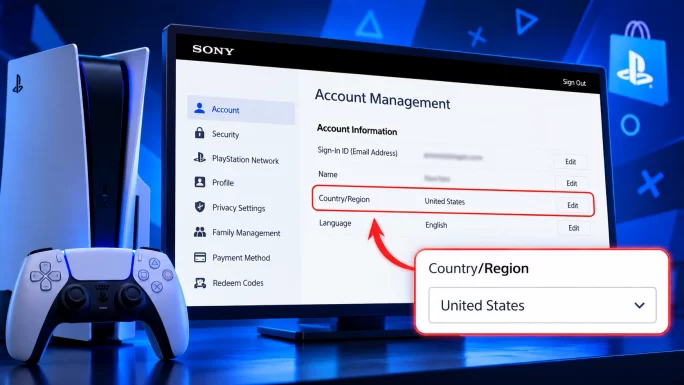
Buy the PSN gift card for the same country as your PlayStation account. A UK card only works on a UK account, a German card on a German account, and so on. You can check your account country in Account Management → Your Information.
Why PSN Gift Cards Are Region Locked
Every PlayStation account belongs to one country. Sony sets prices, taxes and the catalogue per country, so each PlayStation Store works a little differently. For that reason, Sony ties every gift card to one store as well.
In Sony’s own words, the voucher code and your account’s country must match for the code to activate. That rule applies even when two countries share the same currency. For example, a French card and a German card are both in euros, yet each one still belongs to its own store.
The same logic covers add-ons and game codes. A PSN code from another region simply won’t redeem on your account, no matter how you enter it.
How to Check Your PlayStation Account Region
Before you buy any card, confirm which country your account uses. It takes less than a minute.
On the PlayStation App, the path is similar. Open the Play screen, tap the settings icon, then go to Account Information and Residential Address.
ImportantYou can’t change the country of an existing PlayStation account. If you move abroad, your account keeps its original region, so you still need cards for that original country.
PSN Gift Card Regions You Can Buy
PlayStation Store gift cards exist for dozens of countries. Here is the full list of regions available on TopGift, grouped by area.
| Area | Countries |
|---|---|
| Eurozone | Austria, Belgium, Croatia, Finland, France, Germany, Greece, Ireland, Italy, Luxembourg, Netherlands, Portugal, Slovenia, Spain |
| Rest of Europe | United Kingdom, Switzerland, Poland, Czech Republic, Hungary, Romania, Sweden, Norway, Denmark, Turkey |
| Americas | United States, Canada, Brazil, Argentina, Colombia |
| Middle East and Africa | UAE, Saudi Arabia, Kuwait, Lebanon, South Africa |
| Asia-Pacific | Hong Kong, Singapore, Thailand, Malaysia, New Zealand |
Remember that a shared currency doesn’t make cards interchangeable. In the Eurozone, for instance, a PlayStation Store Gift Card DE fits a German account, while a Spanish account needs a Spanish card.
What You Can Buy With a PSN Gift Card
A PSN gift card adds money to your PlayStation wallet. After that, you can spend the balance almost anywhere in the PlayStation Store of your country.
Most players use it for full games, DLC and season passes. In addition, the wallet covers in-game currency in many free-to-play games, so you can top up without saving a bank card on your console.
Pre-orders work as well. If a big release is coming, you can load your wallet in advance and pay the moment the pre-order opens.
The wallet also pays for PlayStation Plus. As a result, a single card can renew your membership and still leave money for a new game.
Is a Card From a Cheaper Region Worth It
Prices differ between PlayStation Stores, so some players wonder if a cheaper region saves money. In practice, the answer is usually no.
A card from another country only works on an account from that country. To use it, you would need a second account registered there, with its own wallet and its own game library. Your current trophies, saves and purchases stay on your main account.
On top of that, Sony expects your account details to match where you actually live. So for most people, the simplest and safest choice is a card for the region of the account they already use.
Physical Cards vs Digital Codes
Physical PlayStation cards show their region with a small printed flag. Digital codes, on the other hand, show the region in the product name, for example PlayStation Store Gift Card UK or PlayStation Store Gift Card US.
Both work the same way once redeemed. However, a digital code arrives right after payment, so you don’t need to visit a shop. On TopGift, you’ll find the code in your account and on the order confirmation page.
Which PSN Card to Buy in Your Situation
The right card depends on the country of your account, not on where you live today. Below are the most common cases.
You Live in the Country of Your Account
This is the simple case. Just buy the card for your own country. For example, a UK player needs a PlayStation Store Gift Card UK, and a US player needs a US card.
You Moved to Another Country
Your account still belongs to the country where you created it. Therefore, keep buying cards for that original country. Alternatively, you can create a new account in your new country, but your past purchases won’t move across.
You Are Buying for a Friend
Ask your friend which country their account uses before you order. Since you can’t transfer a code to another region, guessing is the most common way a PSN gift ends up wasted.
You Use Two Accounts
Some players keep a second account in another region, for example to get a game that releases earlier there. In that case, buy a separate card for each account. The balance of one wallet never moves to the other.
What Happens If You Buy the Wrong Region
If the regions don’t match, the PlayStation Store rejects the code at the redeem step. Your wallet stays empty, and the code remains unused.
Unfortunately, there is no official way to convert a card to another region. In addition, Sony doesn’t let you move funds between accounts. So only an account from that same country can use the card.
That’s why it pays to double-check before checkout. If a code from the right region still won’t work, our guide to gift card errors and fixes covers the other common causes.
How to Redeem a PSN Gift Card
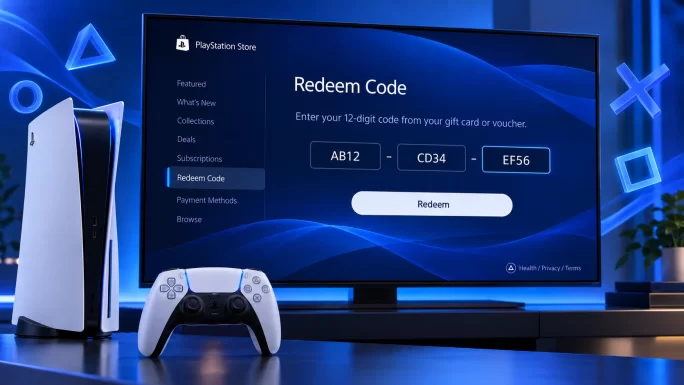
Once you have the right card, redeeming it is quick. Every PlayStation Store code has 12 digits, and you can only use it once.
You can also redeem codes in a web browser. Open the PlayStation Store, select your profile and choose Redeem Code. The PlayStation App offers the same option in the PS Store menu.
Tips Before You Buy
A few small checks save you from most problems.
First, match the country. Check your account region, then pick the card for that exact country.
Next, think about the value. Choose an amount close to what you plan to spend, because wallet funds can’t move to another account later.
Also, remember that wallet funds pay for PlayStation Plus too. One card can therefore cover both games and your membership.
Finally, keep the code private. Anyone who sees it can redeem it before you do.
Frequently Asked Questions
Can I use a PSN gift card from another country?
No. Sony only activates a voucher when its country matches your account’s country. A card from another region won’t redeem.
Do Eurozone PSN cards work in every euro country?
No. Each card belongs to one country’s store, even if the currency is the same. A German card works on a German account, and a French card on a French account.
How do I know which PSN region my account is?
Sign in to Account Management, open Your Information and select Edit next to Residential Address. Your country/region appears at the bottom.
Can I change my PSN account region?
No. Sony doesn’t allow you to change the country of an existing account. You can only create a new account in another country.
What happens if I redeem the wrong region card?
The code simply won’t redeem, and your wallet stays unchanged. The code stays usable on an account from its own country.
How many digits does a PSN gift card code have?
PlayStation Store codes have 12 digits. Enter them exactly as shown, without spaces.
Key Takeaways


